ScreenBuddy
Get it — $9.99
macOS 12+ · M1/M2/M3 & Intel
Windows Coming Soon

The Mac Screen Recorder That Auto-Zooms on Your Clicks

ScreenBuddy watches where you click and automatically zooms in with smooth animation. Record, add backgrounds & annotations, export polished MP4s — all in one native Mac app.

One-time purchase — no subscription30-day money-back guarantee67% off — Early Access pricing
Live on FoundrList
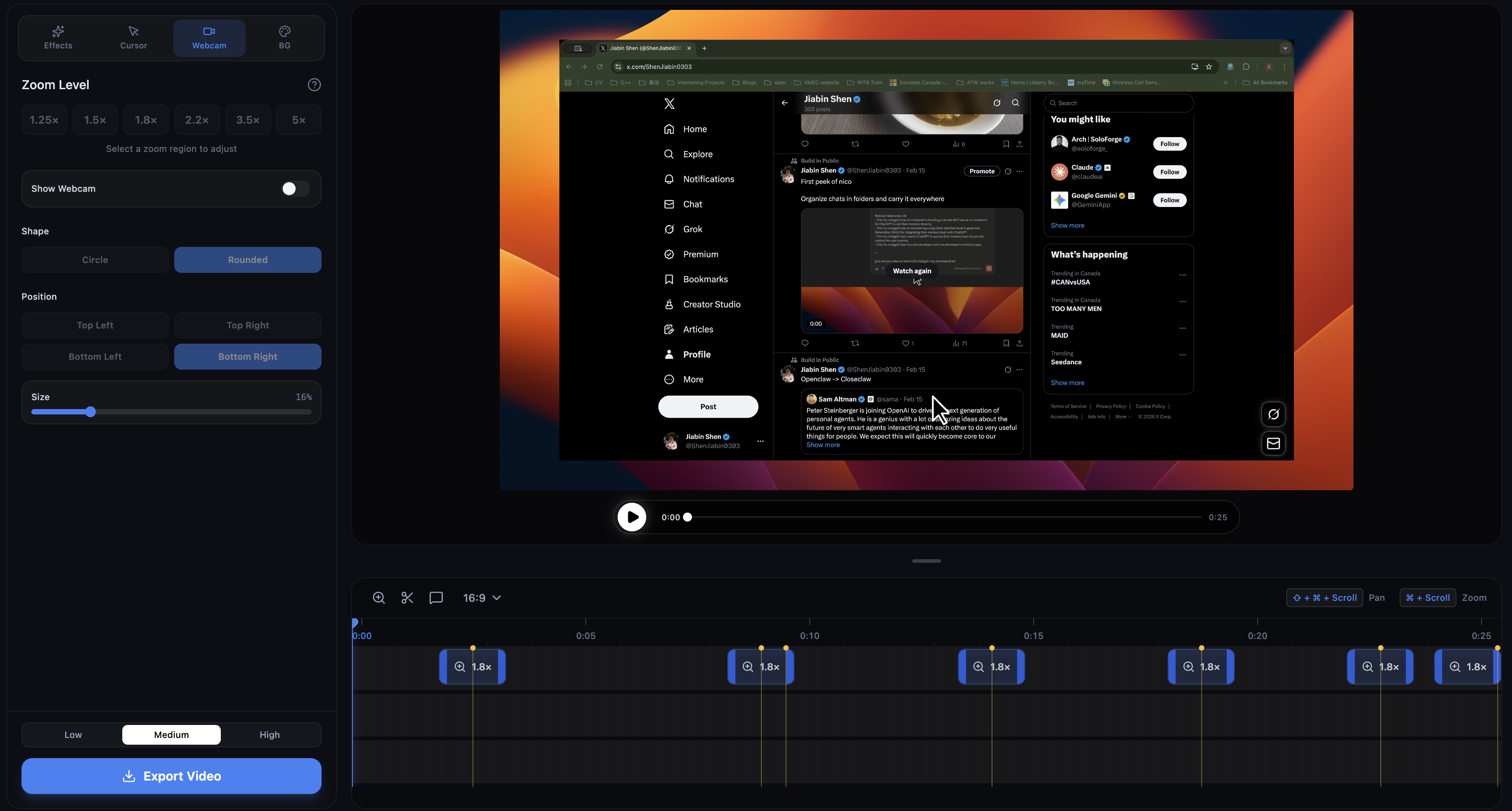
ScreenBuddy macOS app interface showing the video editor with zoom effects, timeline, and background controls
Auto-Zoom on Every Click
100% Offline & Private
One-time Purchase — No Subscription
macOS Native · Windows Coming Soon

Record Once, Edit Everything — No Extra Software Needed

Record, edit, and export polished videos with powerful built-in tools

Key Differentiator

Auto-Zoom That Follows Your Clicks

No other screen recorder does this. ScreenBuddy watches where you click and automatically zooms in with smooth animation — from 1.25x to 5x. Your viewers see exactly what matters, without you lifting a finger.

Screen Recording

Record your full screen or specific application windows with crystal-clear quality. Capture system audio and microphone simultaneously.

Insert Annotations

Add text overlays, images, arrows, and shapes with full styling control. Customize fonts, colors, borders, and shadows for every element.

Change Backgrounds

Choose from 18 gradient presets, solid colors, or custom images. Add padding, corner radius, and shadow effects for a polished look.

Customize Cursor Size

Adjust cursor size to make it more visible in your recordings. Perfect for tutorials and presentations where viewers need to follow along.

Webcam Recording

Overlay your webcam feed on screen recordings for a personal touch. Perfect for product demos, tutorials, and presentations.

How It Works

Create polished screen recordings in three simple steps

1

Record

Capture your screen, window, or app with system and microphone audio

2

Edit

Add zoom effects, annotations, backgrounds, and trim your footage

3

Export

Save as MP4 or GIF in your preferred resolution and aspect ratio

Built for People Who Ship

Whether you demo, teach, or document — ScreenBuddy fits your workflow

Product Teams

Ship feature demos and bug reports with auto-zoom that highlights exactly what you clicked.

Educators & Course Creators

Record tutorials with large cursor, annotations, and backgrounds that keep students focused.

Developer Advocates

Create documentation videos and API walkthroughs with clean, branded exports.

Loved by Creators, Educators & Dev Teams

Here’s what people are saying about ScreenBuddy

The auto-zoom feature alone is worth it. I used to spend 20 minutes manually keyframing zoom effects in Premiere. ScreenBuddy does it automatically in real time.

M
Marcus T.
Developer Advocate

I switched from Loom because I wanted my recordings to look more polished without paying $150/year. ScreenBuddy was $9.99 once and the gradient backgrounds make every video look professional.

S
Sarah K.
Course Creator

Our product team uses ScreenBuddy for all feature demos and bug reports. The fact that everything stays on our machines — no cloud uploads — was a requirement for us.

J
James L.
Engineering Manager

Why Not Loom, OBS, or Camtasia?

Great tools — but ScreenBuddy fills the gaps they leave

vs. Loom

  • Auto-zoom effects on every click
  • No monthly subscription ($9.99 once)
  • Works completely offline
  • No recording time limits
Read full comparison →

vs. OBS

  • Auto-zoom on clicks
  • Built-in video editor
  • Custom backgrounds included
  • No learning curve
Read full comparison →

vs. Camtasia

  • Auto-zoom (vs unpredictable Smart Focus)
  • $9.99 vs $250+
  • Simpler, focused workflow
  • Native macOS performance
Read full comparison →

What You’d Pay Over 2 Years

ToolModel2-Year Cost
Loom Business$12.50/mo$300
CamtasiaOne-time$250+
CleanShot XOne-time$29
ScreenBuddyOne-time$9.99

Simple, One-Time Pricing

Pay once, use forever. No subscriptions.

Early Access

ScreenBuddy for Mac

$29.99$9.99
Save 67% during Early Access
Price increases to $29.99 after Early Access ends
Pay once, use forever
  • Screen recording with system & mic audio
  • Manual & auto zoom effects (1.25x-5x)
  • Text, image, and arrow annotations
  • 18 gradient backgrounds + custom images
  • Trim, crop, and resize
  • MP4 export
  • Keyframe timeline editor
  • Multiple aspect ratios
  • Lifetime updates included
  • Works entirely offline
Get ScreenBuddy — $9.99
30-day money-back guarantee
Version 1.1.3·macOS 12+·Intel & Apple Silicon·Windows Coming Soon
Or try the free online tools first

First Launch Setup

Get started in three quick steps

1

Download

Download ScreenBuddy from the pricing section above

2

Allow in Settings

If macOS shows a security prompt, open System Settings › Privacy & Security

3

Click Open Anyway

Click "Open Anyway" next to ScreenBuddy — you only need to do this once

ScreenBuddy processes everything locally — no data ever leaves your Mac.

Frequently Asked Questions

What are the system requirements?
ScreenBuddy requires macOS 12 (Monterey) or later. It supports both Intel (x64) and Apple Silicon (arm64) Macs. A Windows version is in development and coming soon.
Is this a one-time purchase or subscription?
ScreenBuddy is a one-time purchase. Pay once and use it forever, including all future updates.
What export formats are supported?
You can export your recordings as MP4 (H.264) or GIF. Multiple aspect ratios and quality presets are available.
Does ScreenBuddy require an internet connection?
No. ScreenBuddy works entirely offline. All recording, editing, and exporting happens locally on your Mac.
Can I record system audio?
Yes. ScreenBuddy can capture system audio, microphone input, or both simultaneously during screen recording.
What zoom levels are available?
Manual zoom ranges from 1.25x to 5x. Auto-zoom automatically follows your cursor for a dynamic presentation effect.
Is there a free version?
We offer free browser-based tools including a screen recording editor and WebM-to-MP4 converter. The macOS app offers the full professional experience.
Why does macOS show a warning when I first open ScreenBuddy?
macOS shows this for apps downloaded outside the Mac App Store. It’s a one-time security check. Open System Settings › Privacy & Security and click "Open Anyway." ScreenBuddy works entirely offline and never sends data anywhere.

Stop Spending Hours on Screen Recording Edits

Auto-zoom, backgrounds, and annotations in one click. No subscription, no cloud uploads, no learning curve. Just polished recordings.

Early Access pricing: $29.99 $9.99 — price goes up soon

Get ScreenBuddy — $9.99
30-day money-back guarantee